2025.1.24
首先契机是最近libmsaoaidsec这个so文件的反调试被大佬们打烂了
我从中学习了一下,也快速总结了一些思路
首先如果有frida检测的话,可以先去hook一下dlopen
dlopen
这个函数是liunx环境下一个运行时动态加载链接库(也就是so)的一个函数,通过直接hook这个函数我们可以知道在frida hook时加载到那个函数就会死掉
function hook_dlopen1() {//查看so的加载流程
    Interceptor.attach(Module.findExportByName(null, "android_dlopen_ext"),//这个是64位后的名字,如果是32位的就直接hook dlopen
        {
            onEnter: function (args) {
                this.fileName = args[0].readCString()
                console.log(`dlopen onEnter: ${this.fileName}`)
            }, onLeave: function(retval){
                console.log(`dlopen onLeave fileName: ${this.fileName}`)
                if(this.fileName != null && this.fileName.indexOf("libmsaoaidsec.so") >= 0){
                    let JNI_OnLoad = Module.getExportByName(this.fileName, 'JNI_OnLoad')
                    console.log(`dlopen onLeave JNI_OnLoad: ${JNI_OnLoad}`)
                }
            }
        }
    );
}
过反调试
直接hook后很容易发现在加载libmsaoaidsec后程序直接退出,而且我们同时在onLeave时hook了jni_load函数,但是并没有回显,这可以说明,这个反frida是发生在jni_load之前的

直接反编译libmsaoaidsec看看
直接看init_proc,至于为什么可以看:
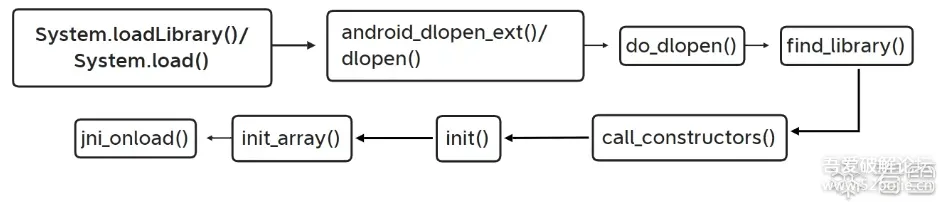
在加载库后,系统会调用 call_constructors 来执行 .init_array 中的所有初始化函数,.init_proc 中的代码一般由开发者定义,它可能会调用一些重要的逻辑函数,比如初始化全局变量,设置反调试、密钥初始化等。
这里直接借用正己大佬的图了,可以看到在dlopen后最先的就是init_proc
使用d810插件即可去除
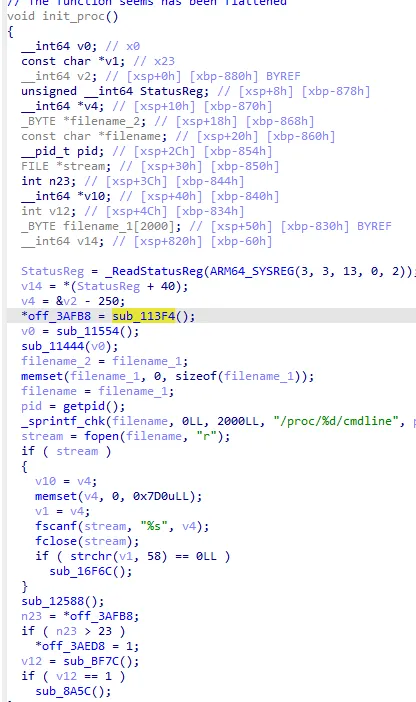
网上做法挺多的,有hook sub_113F4这个函数中的 _system_property_get("ro.build.version.sdk", v1);来让自身断在init前面的,还有直接nop或者删除的,还有直接不让加载libmsaoaidsec这个so的,
但是他具体的混淆,就在与使用pthread_create加载反调试函数,这里就是sub_16D30和sub_175F8,再往里面走还有一个pthread_create_sub_16D30
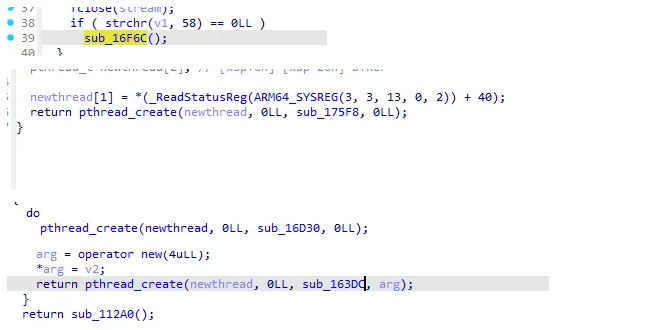
这里参考的大佬的方法替换对应函数为空函数,当然也可以nop,网上还有hook_dlsym的,这里运行后程序会爆掉没一开始我以为可能是这种方法有问题,而且运行完后进行hook还是hook不上,所以就选择了一个比较暴力的方法过掉反调试——不让其加载libmsaoaidsec这个库
pl:其实方法一也是对的,在加载完反hook脚本后,进行正常hook时,第二次hook后就能附加上了,其实挺奇怪的,至于为什么过掉反调试后仍然崩溃了,可能是因为,第二个pthread_create循环了562717065次?反汇编代码怪怪的
function hook_dlopen(){
    var android_dlopen_ext = Module.findExportByName(null,"android_dlopen_ext");
    console.log("addr_android_dlopen_ext",android_dlopen_ext);
    Interceptor.attach(android_dlopen_ext,{
        onEnter:function(args){
            var pathptr = args[0];
            if(pathptr!=null && pathptr != undefined){
                var path = ptr(pathptr).readCString();
                if(path.indexOf("libmsaoaidsec.so")!=-1){
                    console.log("android_dlopen_ext:",path);
                    hook_call_constructors()
                }
            }
        },
        onLeave:function(retvel){
            console.log("leave!");
        }
    })
}

function hook_call_constructors() {
    let linker = null;
    if (Process.pointerSize === 4) {
        linker = Process.findModuleByName("linker");
    } else {
        linker = Process.findModuleByName("linker64");
    }
    let call_constructors_addr, get_soname
    let symbols = linker.enumerateSymbols();
    for (let index = 0; index < symbols.length; index++) {
        let symbol = symbols[index];
        if (symbol.name === "__dl__ZN6soinfo17call_constructorsEv") {
            call_constructors_addr = symbol.address;
        } else if (symbol.name === "__dl__ZNK6soinfo10get_sonameEv") {
            get_soname = new NativeFunction(symbol.address, "pointer", ["pointer"]);
        }
    }
    console.log(call_constructors_addr)
    var listener = Interceptor.attach(call_constructors_addr, {
        onEnter: function (args) {
            console.log("hooked call_constructors")
            var module = Process.findModuleByName("libmsaoaidsec.so")
            if (module != null) {
                Interceptor.replace(module.base.add(0x175f8), new NativeCallback(function () {
                    console.log("0x175f8:替换成功")
                }, "void", []))
                Interceptor.replace(module.base.add(0x16d30), new NativeCallback(function () {
                    console.log("0x16d30:替换成功")
                }, "void", []))
                Interceptor.replace(module.base.add(0x163dc), new NativeCallback(function () {
                    console.log("0x163dc:替换成功")
                }, "void", []))
                listener.detach()
            }

        },
    })
}
function hook_dlopen_libmsaoaidsec() {
Interceptor.attach(Module.findExportByName(null, "android_dlopen_ext"), {
onEnter: function (args) {
var pathptr = args[0];
if (pathptr !== undefined && pathptr != null) {
var path = ptr(pathptr).readCString();
if (path.indexOf('libmsaoaidsec') >= 0) {
ptr(pathptr).writeUtf8String("");
console.log("rewrite libmsaoaidsec.so ptr ");
}
}
}
});
}总之大致是使用第二种方式进行探索的
正式分析
本文目的是去掉七猫的广告及获得vip字样
具体可以使用mt再查看下方博客(这个改得太详细了,我只改了一两点)
https://bbs.binmt.cc/thread-133587-1-1.html
如果你跟着改完之后再打开七猫后会发现,下方会弹出验签失败的弹窗,要搞清楚这个是从哪来的感觉使用jadx效率还是太过于低下了,所以使用frida hook弹窗类,再打印堆栈
function printStacks() {
    console.log(
        Java.use("android.util.Log")
        .getStackTraceString(
            Java.use("java.lang.Throwable").$new()
        )
    );
}
function main1() {
    var toast = Java.use("android.widget.Toast");
        toast.show.implementation = function () {
        console.log("toast.show: ");
        printStacks();
        return this.show();
       }
}
可以看见相关函数,打开jadx后找到,发现相关类一共有abc三个类,遂一起hook
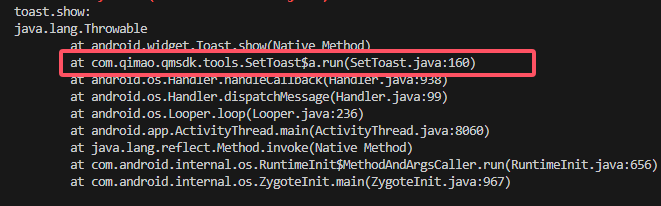



由于我们只需要知道传入值,那么就hook构造函数即可,这里可以看见这个验签错误是在b类中且是传入的
    let a = Java.use("com.qimao.qmsdk.tools.SetToast$a");
    a["$init"].implementation = function (str, textView, context, i, i2, i3, i4) {
        console.log(`a.$init is called: str=${str}, textView=${textView}, context=${context}, i=${i}, i2=${i2}, i3=${i3}, i4=${i4}`);
        this["$init"](str, textView, context, i, i2, i3, i4);
    };
    let b = Java.use("com.qimao.qmsdk.tools.SetToast$b");
    b["$init"].implementation = function (str, textView, context, i, i2, i3) {
        console.log(`b.$init is called: str=${str}, textView=${textView}, context=${context}, i=${i}, i2=${i2}, i3=${i3}`);
        this["$init"](str, textView, context, i, i2, i3);
    };
    b["run"].implementation = function () {
        console.log(`b.run is called`);
        this["run"]();
    };
    let c = Java.use("com.qimao.qmsdk.tools.SetToast$c");
    c["$init"].implementation = function (dVar, view, context, i, i2) {
        console.log(`c.$init is called: dVar=${dVar}, view=${view}, context=${context}, i=${i}, i2=${i2}`);
        this["$init"](dVar, view, context, i, i2);
    };
    c["run"].implementation = function () {
        console.log(`c.run is called`);
        this["run"]();
    };
其实看一下b类的相关代码就可以发现是包体相关的了
burp抓包
主要抓登录包,这里肯定会有签名
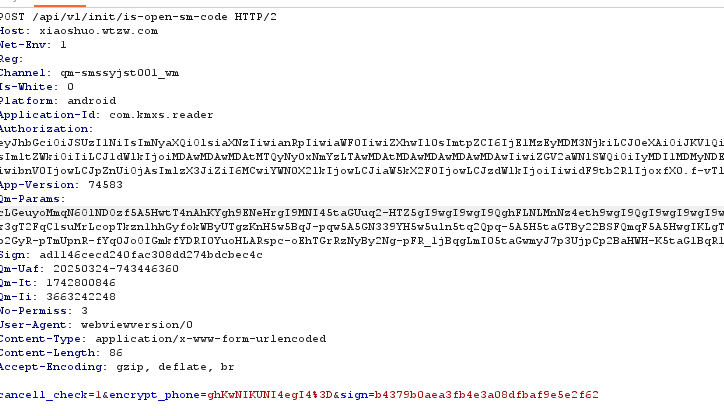
jadx搜索一下/api/v1/init/is-open-sm-code,运气很好,搜到了
点进KMRequestBody继续分析
相当明显,hook确认一下
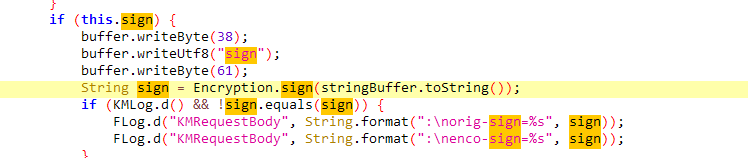
Java.perform(function(){
        var is_sign = false;
        let Buffer = Java.use("okio.Buffer");
        Buffer["writeUtf8"].overload('java.lang.String').implementation = function (str) {
            if (str == "sign") {
                is_sign = true;
            }
            let ret = this.writeUtf8(str);
            return ret;
        };
        let Encryption = Java.use("com.qimao.qmsdk.tools.encryption.Encryption");
        Encryption["sign"].implementation = function (str) {
            var a = this.sign(str);
            if(is_sign)
            {
                console.log(`Encryption.sign is called: str=${str}`);
                console.log(`Encryption.sign result=${a}`);
                is_sign = false;
            }
            return a;
        };
    })
对胃了
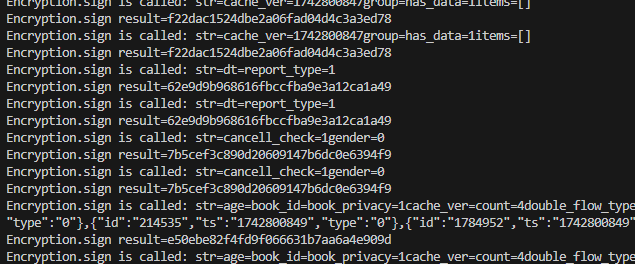
从这来的

这下看懂了
逆向so
那问题来了,如何确认so?
总体来讲有两种(?)
1、经验,由于这种加密一般都是自实现的,可以直接通过名字去猜,无非就是多花点时间
2、看见网上大佬使用frida-dump去打印堆栈也是可以的
3、也就是这里使用的方法,感觉并不是很通用,有一定的运气成分,直接查看调用或者查看加载的so进行排除之类的
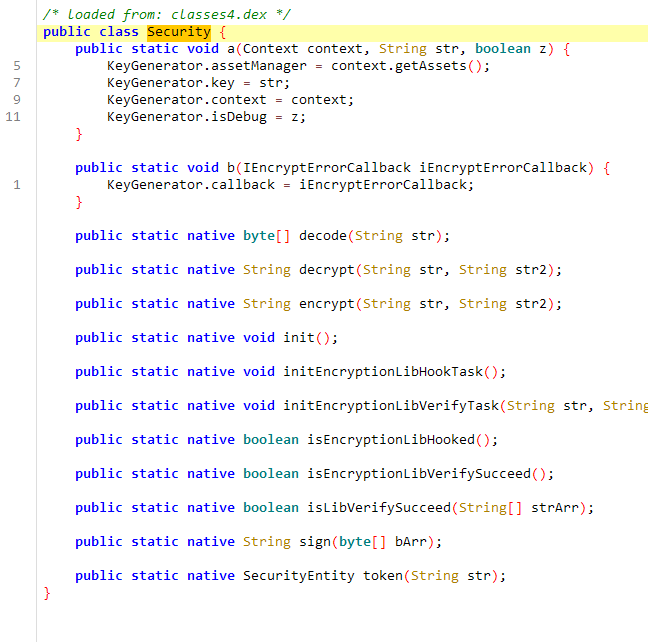
4、还有就是感觉厂商有可能会将so文件直接命名为java层的类,比如这里的Security类,就直接命名为libsecurity也是有可能的
但在这里,直接查看Security的调用,可以直接确定是libcommon-encryption.so

jni没什么东西还疑似有debug,直接搜索java
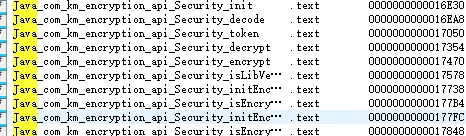
frida直接hook
几个可疑的试了一下时候发现应该是Java_com_km_encryption_api_Security_token
一个加盐的md5

function hook_native_addr() {
    var base = Module.findBaseAddress("libcommon-encryption.so");
    var funcPtr = base.add(0x1fb34);
    if(base == null)
    {
        setTimeout(hook_native_addr,1000);
    }
        Interceptor.attach(funcPtr, {
            onEnter: function (args) {

            }, onLeave: function (retval) {
                console.log("11111111: "+retval.readUtf8String())
                console.log("-----------------------------------------------------------")
            }
        });
    var fun2 = base.add(0x172BC)
        Interceptor.attach(fun2, {
            onEnter: function (args) {
            }, onLeave: function (retval) {
                console.log("22222222: "+retval.readUtf8String())
                console.log("-----------------------------------------------------------")
            }
        });
    var fun3 = base.add(0x1F1EC)
        Interceptor.attach(fun3, {
            onEnter: function (args) {
            }, onLeave: function (retval) {
                console.log("33333333: "+retval.readUtf8String())
                console.log("-----------------------------------------------------------")
            }
        });
}